


Frontier Airlines
4.816.75K Reviews
App Specs
- Version
- 3.6.4 Build-960
- Updated On
- License
- Free
- Downloads
- 5,000,000+
- Developer
- Frontier Airlines
- Categories
- Travel & Local
- Platform
- Android, iOS
Screenshots
 Analysis by AppCompare
I find a dedicated airline app most useful when it turns a trip into a repeatable routine: book, check the details, and have the travel documents ready before reaching the airport. Frontier’s app is built around that airline-specific job rather than serving as a general travel planner. That focus can save time if you already know you want to fly with Frontier, while travelers still comparing several airlines will likely want a broader search tool as well.
Frontier Airlines is a free travel app from Frontier Airlines, and it has an average rating of 4.8 from around 154,000 ratings. It has been available since 2015, is rated for everyone, and the current version is 3.4.3 Build-824, for devices running Android 11 or later. Those details make it easy to check whether it fits your device and preferences, but the more important question is whether an airline’s own app suits the way you travel.
A practical routine from search to departure
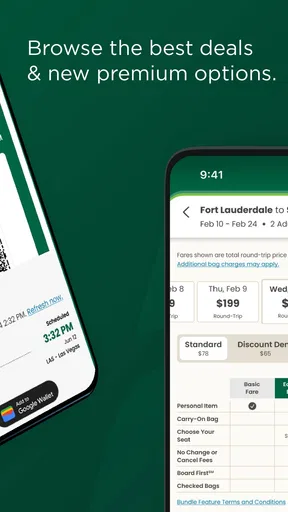
For a trip I have already decided to take, I would start in the app by entering the departure city, destination, and dates. The original review found the search filters and calendar view straightforward, with the calendar highlighting cheaper days. That can be useful when my dates are flexible: I can compare nearby departure days before committing, instead of assuming the first date I entered is the best fit.
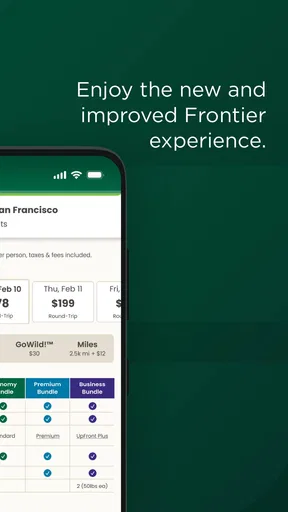
Once I choose a flight, the booking flow brings decisions such as seats and baggage into the same process. I would pause here and check the full trip setup rather than rushing through the screens. A low fare only helps if the flight and any extras I need make sense together. Choosing a seat or adding baggage during booking is convenient, but it also makes it worth reviewing each selection before payment so I do not confuse an optional extra with something I actually need.
That trade-off is central to using an airline app well: convenience comes from handling the booking in one place, while careful choices come from knowing what I want before I tap through. Frontier’s app is most useful when I have a reasonably clear plan and want to act on it. If I am still deciding between destinations, departure times, and different carriers, a general travel search app is better suited to the first round of comparison.
Making the app work for the whole trip
I find the app most useful when I treat it as the place to keep a Frontier trip organized, rather than as my only travel-planning tool. In this section, I’d focus on the handoff between booking, checking the itinerary, and having travel details ready before leaving home. That simple routine also makes it easier to decide which settings and habits deserve attention next.
Check the trip details before travel day
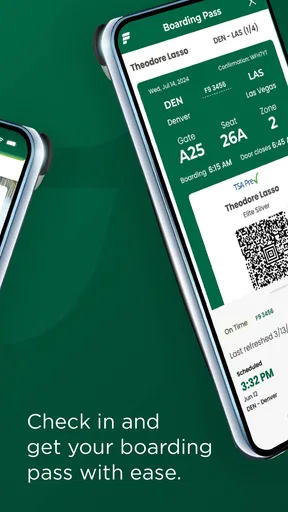
After booking, the Manage Trip area is the natural place to revisit the itinerary and handle changes or extras. I would treat it as a check-in point for the trip rather than something to open only when there is a problem. A quick review before leaving home can help me catch an incorrect date, confirm the details I selected, and make sure the boarding pass is easy to reach when I need it.
Worth Reading Before You Choose

EA SPORTS FC Mobile 26 Is a Bigger Football Game, but It Takes Time

Flipboard Shows What News Apps Must Do Beyond the Feed

Switching to Android Auto Means Rethinking Your Driving Routine

Google Calendar Makes a Crowded Week Easier to Manage

Ludo King Makes the Most of the Minutes Between Plans

Baby Panda World Brings Quick Play to Modern Phones, but Its Game Library Feels Busy
For a realistic example, imagine I have a flexible weekend trip and book after comparing a few dates in the calendar. I can make the flight choice first, decide whether I need a seat selection or baggage, and then return to the itinerary later to check that the arrangements still look right. On travel day, having the boarding pass available in the app means I have one less thing to search for in my email or photo gallery. The benefit is not dramatic, but it is exactly the kind of small reduction in hassle that makes an airline app worthwhile.
Flight notifications can also help me keep track of updates without repeatedly checking the itinerary myself. I would still look at the app directly when making a decision, especially if I am on my way to the airport. A notification is a useful prompt, not a substitute for checking the current trip information before acting. That distinction matters when plans are time-sensitive: use alerts to notice that something may need attention, then open the trip details to see what to do.
Settings and habits worth checking
I would begin by checking that the app is ready to show the trip information I expect and that notifications are enabled if I want flight updates. Notification preferences are also personal: some travelers want every timely prompt, while others prefer fewer interruptions and are comfortable checking their itinerary manually. The useful setting is the one that matches how you travel, not simply the one that produces the most alerts.
A second helpful habit is to review the booking before travel day instead of relying on memory. Confirm the departure and destination, the date, and any choices you made for the trip. If plans change, use Manage Trip to see what can be handled there. I would avoid assuming that every possible change can be completed in the app; when a change is important and the available options do not resolve it, contacting the airline through its appropriate support channel is a more sensible next step than repeatedly tapping around.
For people who travel with others, it can also help to decide who is responsible for keeping the itinerary and boarding information accessible. That small bit of coordination prevents two people from assuming the other has the details ready. The app’s value is clearest when the person holding the booking knows where to find it and checks it at useful moments, rather than expecting the phone to organize the entire trip automatically.
Faster patterns for repeat travelers
Experienced users can make the process feel quicker without relying on hidden tools. I would use a consistent order each time: compare dates, select the flight, consider the seat and baggage choices, finish the booking, then return to Manage Trip for a final review. Repeating that sequence reduces the chance of overlooking a decision because it gives each part of the booking a clear place in the routine.
If I fly often enough to collect FRONTIER Miles, I would check the mileage balance and rewards as part of planning rather than treating them as an afterthought. The app brings the program into the same place as trip management, making it convenient to keep an eye on progress. The practical trade-off is that rewards are most useful when they fit a trip I already want to take; I would not let a balance alone dictate dates or destinations that do not work for me.
Another time-saving habit is to open the app before reaching the airport, while I still have a stable connection and a moment to focus. I can confirm the itinerary and locate the boarding pass before joining a queue or juggling bags. This is not a special feature so much as a good workflow: the app can make key trip details convenient, but planning ahead is what makes that convenience count.
Where it fits among travel apps
Compared with a general travel app, Frontier’s app has a narrower job. A broader service is usually more useful when I want to compare multiple airlines or assemble several parts of a trip in one search. Frontier’s own app makes more sense once I have chosen the airline or when I want a direct place to book and manage a Frontier itinerary. I see these tools as complements rather than replacements: search broadly when I am undecided, then use the airline app for the trip itself.
That distinction also helps set expectations. This is not a general destination guide or an all-purpose travel organizer; its strongest purpose is handling Frontier travel. The app can keep booking, trip details, miles, and flight information close together, but it should not be mistaken for a neutral comparison service. If price, schedule, or routing across several airlines is still the main question, I would compare those options before moving into Frontier’s booking flow.
Who will benefit, and where friction remains
I would recommend the app to travelers who have chosen Frontier, want to book from a phone, or prefer keeping their itinerary and boarding pass within the airline’s own service. It is also a sensible fit for repeat customers who want to check FRONTIER Miles alongside upcoming travel. The app’s popularity—more than five million installs—suggests it has a broad audience, though a large user base cannot tell me whether its particular workflow suits every traveler.
It is less compelling for someone who flies many airlines and wants one place to compare or manage all of them. Such a traveler may still install it for a Frontier booking, but a broader travel app can be more convenient as the main planning hub. Likewise, if I prefer to handle every booking with a person or do not want airline updates on my phone, the app may add little to my routine. Its usefulness depends on choosing to manage at least part of the trip digitally.
There is also a practical limit to relying on any single phone app at the airport: battery, connectivity, and access to the device matter. I would keep the phone charged and know how to retrieve the trip details again if I close the app. For an important journey, having the booking information available through another accessible route is a reasonable backup. That is not a flaw unique to Frontier; it is a sensible precaution whenever a boarding document lives on a phone.
My verdict after building a routine around it
In my view, Frontier Airlines earns its place on a phone when I am actually flying with Frontier. The most useful approach is deliberate rather than complicated: compare dates when flexible, review optional choices during booking, revisit Manage Trip before departure, and use notifications as prompts to check the current itinerary. Those habits make the app more dependable without expecting it to do the work of a full travel agent.
The app is not the right starting point for every trip. I would choose a broader comparison tool while weighing different airlines, and I would look elsewhere for general destination planning. But once Frontier is the airline I intend to use, having the booking and trip information together is a straightforward convenience. If that matches how you travel, it is worth trying; if you want one service to organize every carrier and every part of a journey, keep a general travel app in your toolkit too.
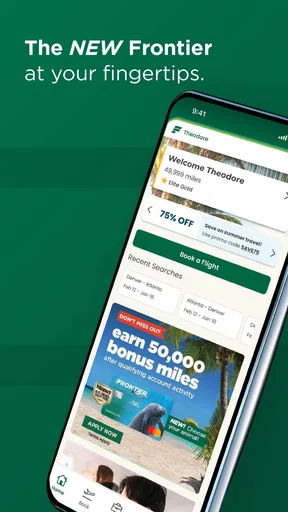
The first thing that caught my eye when I downloaded the Frontier Airlines app was its clean and minimalistic design. It’s super user-friendly, which is a huge plus if you’re like me and not particularly tech-savvy. Signing up was a breeze, and within minutes, I was ready to explore the app’s features.
Booking a Flight
Booking a flight through the app is as easy as pie. I love how it lets you search for flights with various filters like departure city, destination, and dates. Plus, it has this nifty calendar view that highlights the cheapest days to fly. Honestly, who doesn’t love saving a few bucks?
Once you select your flight, the app walks you through the booking process. You can easily choose your seat, add baggage, or even upgrade to their “Stretch Seating” for extra legroom. It’s like the app knew I needed a bit more space for my long legs!
Manage Your Trip
One of the standout features for me is the “Manage Trip” section. It’s perfect for keeping track of your itinerary, making changes to your booking, or adding extras like rental cars or hotels. The app sends timely notifications, so you’re always updated on your flight status—no more frantic last-minute airport dashes!
Frequent Flyer Perks
If you’re a frequent flyer, you’ll appreciate the “FRONTIER Miles” program integrated into the app. It’s straightforward to track your miles and redeem rewards. I found it particularly rewarding to see those miles add up, bringing me closer to another adventure.
In-Flight Experience
Okay, so the app itself doesn’t provide in-flight entertainment, but it does offer all the info you need for a smooth journey. From boarding passes to flight updates, everything’s at your fingertips. I loved being able to access my boarding pass directly from the home screen. It’s a small detail, but it makes the whole process feel seamless.
Final Thoughts
All in all, the Frontier Airlines app is a solid choice if you’re looking for convenience and affordability in your travel plans. It’s packed with useful features that make booking and managing your flights a breeze. Whether you’re a seasoned traveler or planning your first getaway, this app could be your new travel buddy. So, why not give it a whirl and see where your next adventure takes you?
Pros
- User-friendly interface for booking flights.
- Offers affordable ticket prices regularly.
- Wide range of destinations available.
- Frequent flyer program with good rewards.
- Easy to manage bookings via mobile app.
Cons
- Limited in-flight entertainment options.
- Additional fees for seat selection.
- No complimentary snacks or drinks.
- App can occasionally be slow or crash.
- Customer service response can be delayed.
FAQs for Frontier Airlines
What features does the Frontier Airlines app offer?
The Frontier Airlines app provides a range of features designed to enhance your travel experience. Users can book flights, check in, and manage their reservations directly from the app. Additionally, the app offers real-time flight status updates, seat selection, and access to digital boarding passes, making travel more convenient and efficient.
Is the Frontier Airlines app free to download and use?
Yes, the Frontier Airlines app is free to download on both Android and iOS platforms. While the app itself doesn't have any associated download costs, users should be aware that booking flights and additional services through the app will incur the usual fees charged by the airline.
Does the Frontier Airlines app support mobile check-in?
Absolutely, the Frontier Airlines app supports mobile check-in, allowing passengers to check in for their flights directly from their smartphones. This feature is available 24 hours prior to departure, providing a seamless and paperless check-in experience. Users can also download their boarding pass to their device for easy access at the airport.
Can I earn and manage frequent flyer miles using the app?
Yes, the Frontier Airlines app allows you to earn and manage your frequent flyer miles. By signing into your account, you can track your mileage balance, view your transaction history, and redeem miles for rewards. This makes it easier for frequent travelers to keep track of their benefits and rewards.
What should I do if the Frontier Airlines app is not working properly?
If you encounter issues with the Frontier Airlines app, first ensure that you have the latest version installed. Sometimes, simply updating the app can resolve many problems. If the issue persists, try restarting your device or reinstalling the app. For further assistance, you can contact Frontier Airlines customer support directly through their website or customer service line.


